
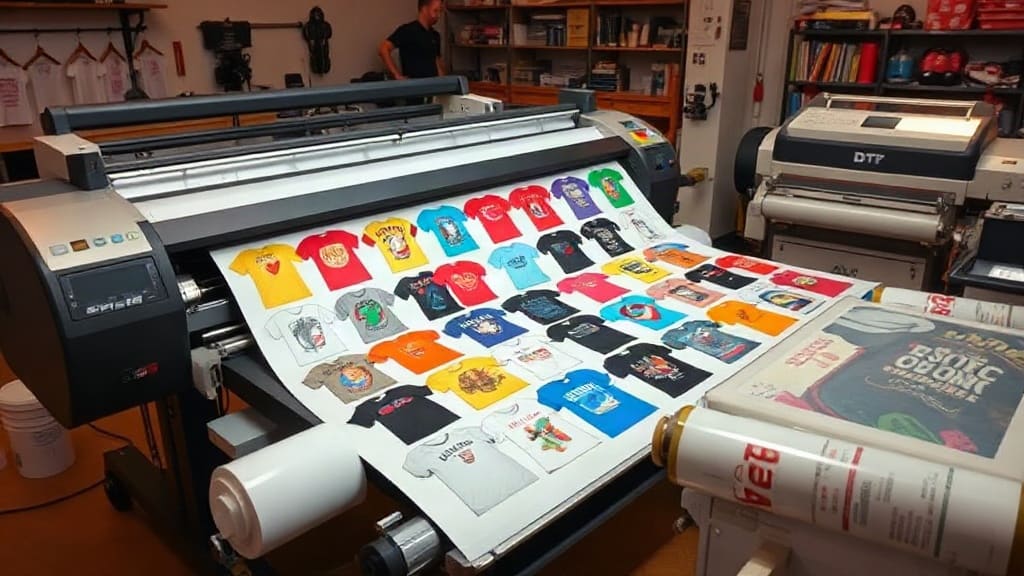
When I first started offering DTF printing services, I wasted countless hours and materials by printing individual designs. Then I discovered DTF gangsheets, and my entire workflow changed. A gangsheet is simply a large sheet where you arrange multiple designs to be printed in one go. It's not just a time-saver; it's a game-changer for efficiency and profitability. If you're tired of babysitting your printer for every small order, this guide is for you. I'll share everything I've learned about gangsheets, from the basics to advanced tricks that took me months to figure out.
What Exactly Is a DTF Gangsheet?
A DTF gangsheet is a single film sheet that contains multiple printed designs, arranged to maximize space. Instead of printing one t-shirt design at a time, you combine several designs onto one sheet. This is similar to gang sheets in traditional screen printing, but for DTF (Direct to Film) technology. The sheet is printed, powdered with adhesive, and cured as a whole. Then you can cut out each design and press it onto garments as needed.
The main advantage? You drastically reduce setup time and material waste. For example, if you have five small left-chest logos, printing them individually wastes film and ink. On a gangsheet, you can nest them tightly, using almost every inch of the film.
Why DTF Gangsheets Matter for Your Business
Time is money in the printing world. Let's say you charge $5 per small logo. If you print one at a time, you might spend 10 minutes per shirt just on printing and pressing. With a gangsheet, you print 20 logos in one cycle, then press them one after another. Your per-unit time drops dramatically, increasing your hourly earnings. Plus, you save on film and powder because you're not wasting partial sheets.
Another benefit is consistency. When you print all designs on one sheet, they go through the same curing process, so colors and adhesion are uniform. This is especially important for orders with multiple items that need to match exactly.
How to Create an Effective DTF Gangsheet
Creating a gangsheet isn't just about throwing designs onto a canvas. A little planning goes a long way. Here's my step-by-step process, refined over hundreds of sheets.
1. Choose the Right Film Size
DTF film comes in various widths, commonly 13", 17", and 24". Your printer's maximum width dictates what you can use. For most desktop DTF printers, 13" or 17" is standard. Larger formats like 24" are for wide-format printers. Pick a film size that matches your typical order volume. If you often print many small designs, a wider sheet lets you fit more per run.
2. Design Placement and Nesting
Nesting means arranging designs to use space efficiently. In your design software (like Photoshop or dedicated RIP software), you can rotate and align designs to fill gaps. For example, if you have circular logos, you can place them in a honeycomb pattern. Leave at least 0.25" between designs for easy cutting. Also, consider the grain of the film; some films have a slight direction, but for DTF it's usually not critical.
Pro tip: Group designs by color complexity. If you have a mix of full-color and simple one-color designs, placing them together can affect ink usage. But modern DTF printers handle variable ink laydown well, so it's not a huge concern.
3. Print Settings and Curing
Each DTF printer and film combination has optimal settings. I recommend running a test sheet with your typical designs to dial in ink density and curing temperature. Too little ink, and colors look faded; too much, and the transfer feels thick. Curing is typically done at 320°F for 2-3 minutes, but always follow your film's instructions. A heat press or conveyor dryer works; I prefer a conveyor for consistency.
Common Mistakes to Avoid with DTF Gangsheets
I've made plenty of mistakes, so you don't have to. Here are the big ones:
- Overcrowding: Leaving no space between designs makes cutting a nightmare and can cause peeling. Always leave a small gap.
- Ignoring film direction: Some films have a coated side; printing on the wrong side ruins the sheet. Always check which side is printable.
- Inconsistent powdering: If you don't apply adhesive powder evenly, some transfers may not stick. Use a powder shaker for even coverage.
- Skipping a test press: Always press a sample before running a full order. Settings can vary by fabric and transfer size.
Advanced Tips for Maximizing Gangsheet Efficiency
Once you're comfortable with the basics, these tips can take your production to the next level.
Use Software Templates
Create templates in your design software with pre-set margins and guides. This speeds up layout and ensures consistency. For example, I have a template for 13x19" sheets with 0.5" margins and a grid overlay.
Batch by Order or Customer
If you have multiple orders, group designs by customer on one sheet. This simplifies cutting and packing. You can also add small labels or numbers near each design to identify them later.
Optimize Ink Usage
If your printer supports it, use variable dot sizes. Larger dots for solid areas, smaller for details. This saves ink and improves quality. Also, consider using a RIP software that optimizes ink laydown.
Keep a Log
Record settings for each film brand and design type. Over time, you'll build a reference library that reduces trial and error.
Frequently Asked Questions About DTF Gangsheets
How many designs can I fit on one DTF gangsheet?
It depends on design size and film dimensions. For a 13x19" sheet, you might fit 10-20 small logos or 2-3 large back prints. Use nesting software to maximize.
Can I mix different design sizes on a gangsheet?
Absolutely. Mixing sizes is common and efficient. Just ensure you leave enough space between designs for cutting.
Do I need special software to create a gangsheet?
Not necessarily. You can use graphic design software like Photoshop or Illustrator. However, dedicated RIP software for DTF can automate nesting and optimize ink usage.
How do I store unused gangsheets?
Store them in a cool, dry place away from direct sunlight. Keep them flat or rolled loosely to prevent creasing. Use them within a few weeks for best results.
What's the best film for gangsheets?
Look for double-sided matte film designed for DTF. Brands like DTF Pro Kit offer reliable films that work well with various printers. Always test before committing to a large roll.
Mastering DTF gangsheets takes a bit of practice, but the payoff is huge. You'll print faster, waste less, and keep customers happier. Start with small batches, learn from each sheet, and soon you'll wonder how you ever managed without them.